







An online ordering system for photo labs is one of those purchases you make once and then live with for years. Your customers interact with it every time they order prints, your staff works in it every day, and switching later means retraining everyone and migrating your product catalog.
We’ve been building ordering software for photo labs since 2019, and we’ve talked to hundreds of lab owners along the way. This guide covers the questions worth asking before you commit to any system - including ours.
1. Browser-Based or Desktop Client?
This is the first fork in the road, and it shapes everything else.
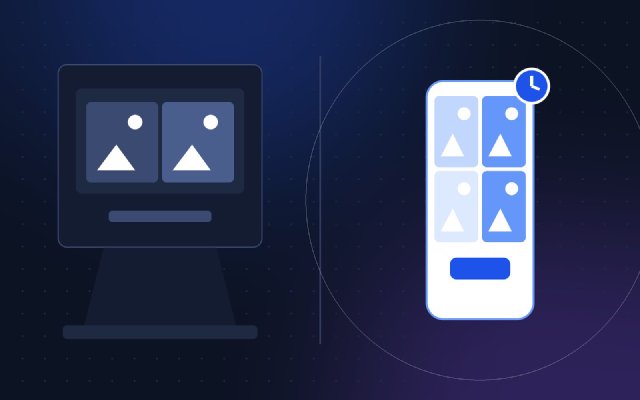
Desktop ordering clients dominated professional labs for two decades. The best-known example is ROES (Remote Order Entry Software), a Java application customers download and install. Desktop clients handle very large orders well and work offline, which mattered a lot on 2005-era internet connections.
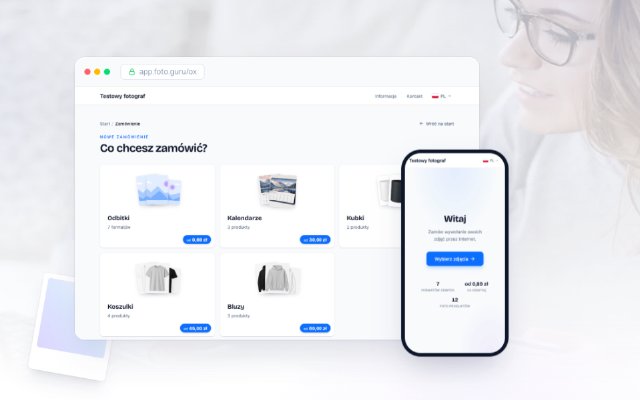
Browser-based systems run entirely in a web browser. The customer opens a link, uploads photos, and orders. Nothing to install, nothing to update, and it works on a phone.
The practical differences:
| Desktop client | Browser-based | |
|---|---|---|
| Installation | Customer downloads and installs | None - just a link |
| Mobile phones | Usually not supported | Works on any smartphone |
| Updates | Customer must update | Automatic, server-side |
| Support burden | “It won’t install” calls | Minimal |
| Works offline | Yes | No (upload needs internet) |
| Huge orders (1000+ files) | Strong | Depends on the system |
For a lab serving mostly consumers and local businesses, browser-based is the safer default in 2026: most of your customers’ photos live on their phones, and a phone can’t install a Java desktop client. If your core business is high-volume professional photographers submitting thousands of files per order, test how a browser system handles your typical order size before deciding.
2. How Much Setup Effort Can You Afford?
Ordering platforms fall into two camps:
- Turnkey platforms with onboarding - a vendor configures your store, sometimes bundled with a website, kiosk software, and lab workflow tools. More complete, but expect a longer setup and higher costs.
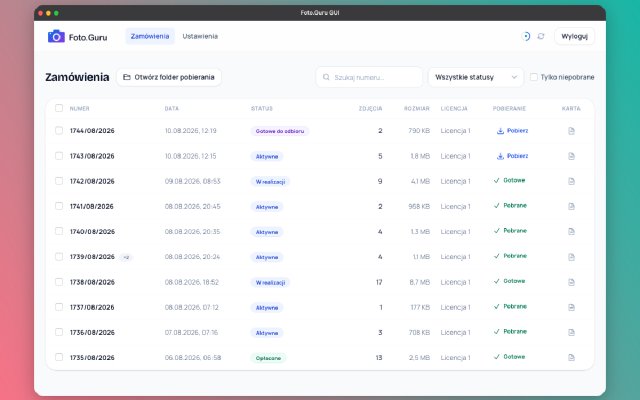
- Self-service systems - you create an account, enter your products and prices in an admin panel, and share the link. Setup is measured in minutes or hours, not weeks.
Questions to ask:
- Can I configure products and prices myself, without a developer?
- How long from signup to my first real order?
- Is there a free trial so I can test with real photos before paying?
For reference: in Foto.Guru, basic configuration takes about 15-30 minutes and there’s a 30-day free trial, so you can validate the whole flow with a few friendly customers before committing.
3. Kiosk Integration or Online-First?
Some vendors sell an ecosystem: in-store kiosk + website + lab software, all connected. That’s valuable if walk-in kiosk traffic is a large part of your revenue and you want one order queue for everything.
If most of your orders could arrive online, an online-first system is simpler and much cheaper - no kiosk hardware, no floor space, no touchscreen maintenance. We’ve written a separate comparison of the two models: Photo Kiosk vs Online Ordering.
A middle path worth knowing about: put a tablet or a simple PC in your store that opens your own online ordering page. You get an in-store ordering station without dedicated kiosk software.
4. Pricing Model: Subscription, Commission, or One-Off?
The three common models, and what they mean over a few years:
Flat subscription
You pay a fixed monthly fee regardless of order volume. Predictable, easy to budget, and the vendor has an incentive to keep you happy month after month. Watch for: order limits, storage limits, and which features sit in higher tiers.
Commission on sales
The vendor takes a percentage of every order. Cheap to start, expensive at scale - if you grow, your software bill grows with your revenue. Do the math on your realistic monthly turnover before treating “free” as free.
One-off license
You buy the software once, often with an annual maintenance fee. Common in the desktop era. The risks are hidden costs (your own server, updates, integration work) and the question of what happens when the vendor stops maintaining it.
A quick sanity check: multiply each option’s real cost by 36 months at your expected volume. Subscriptions in this niche range from single-digit euros to a few hundred euros or dollars per month, so the spread is enormous. Foto.Guru starts at €10.50/month with no commission on orders - the full breakdown is on our pricing page.
5. Whose Brand Is on the Storefront?
Your customers should be ordering from your lab, not from your software vendor. Check:
- Can you use your own logo and colors?
- Can the store run on your own domain (white-label)?
- Do order confirmation emails come from your brand?
- Does the vendor advertise to your customers inside the store?
Many systems offer white-label only in higher plans - in Foto.Guru, a custom domain and full branding are part of the PRO plan. Whatever system you pick, make sure the branding options in your price tier match what you actually need.
6. Payments and Delivery Integrations
An ordering system without online payments just moves the payment chase from the counter to the bank statement. Look for:
- Payment providers available in your country - Stripe and PayPal cover most of Europe and North America; local operators (Przelewy24, PayU, imoje, Paynow and similar) matter in specific markets.
- “Pay on pickup” as an option - some customers will always prefer it, and forcing prepayment loses orders.
- Delivery integrations - courier services and parcel lockers where relevant, with label generation from the order screen instead of copying addresses by hand.
In our earlier analysis of the biggest problems photo studios face, delivery admin and payment tracking together consumed about 1.5 hours per week in a typical small lab. Integrations are where that time comes back.
7. Customer Experience: The Part That Decides Adoption
The best admin panel in the world is worthless if customers find ordering awkward and keep calling instead. Test the customer side yourself, on a phone, before you buy:
- Mobile ordering - can a customer go from camera roll to placed order without a computer?
- Photo cropping - can the customer crop and rotate photos to the print format themselves? This kills the single biggest source of disputes (“why is my head cut off?”).
- Order status - does the customer see progress and get notified when prints are ready, or will they call to ask?
- No account friction - how many steps before the first photo is uploaded?
A good practical test: send the demo link of any system you’re evaluating to a non-technical friend and watch them try to order 10 prints from their phone.
8. Data Ownership and the Exit Door
The unglamorous questions that matter most in year three:
- Who owns the customer data - you or the platform?
- Can you export your order history and customer list?
- Where are photos stored, and for how long?
- If the vendor is outside your jurisdiction, does the setup work with GDPR (for EU labs)?
- What happens to your store if you cancel?
A vendor confident in its product will answer these directly. Evasive answers here are a bigger red flag than any missing feature.
The Short Checklist
Before signing up for anything, you should be able to answer:
- Does it work in a browser, on a phone, with no installs?
- Can I set it up myself, and is there a free trial?
- Do I need kiosk hardware, or is online-first enough?
- What will it really cost per month at my order volume, over 3 years?
- Can it run under my brand, on my domain?
- Does it support my payment providers and delivery methods?
- Can customers crop photos and track orders themselves?
- Can I take my data and leave?
Where Foto.Guru Fits
To be transparent about our own answers: Foto.Guru is a browser-based, online-first system - no installs for you or your customers, built for mobile ordering with customer-side cropping. It’s a flat subscription from €10.50/month with no commission, a 30-day free trial, online payments (including Stripe and PayPal), delivery management, photo products, and white-label on your own domain in the PRO plan. We’re EU-based and have run in production since 2019.
It’s not a kiosk platform and it doesn’t try to be your whole website - if you need those, one of the turnkey ecosystems may fit you better. For everything else, you can check it against the list above in about half an hour:
Start your free 30-day trial →
Not sure whether your lab’s workflow fits? See the FAQ or try the demo first - no signup needed.